Skip to content

Software from Immersi · In preview

Unseam

360 video tools for the Mac, made for our own shoots first. Take the tripod out of any finished 360 video, or stitch the Insta360 Pro 2 from scratch and see the few places worth a look.

First in the preview

Unseam Patch

Take the tripod, and anything else in the way, out of a finished 360 or 180 video, from any camera or stitcher.

For anyone with a 360 video: Insta360 X series, Qoocam, Kandao or GoPro Max owners, or an editor handed a finished file.

In the preview

Unseam Stitch

Stitch the Insta360 Pro 2’s six lenses from scratch, with seams that move round people, and check every place it could go wrong. Includes Patch.

For studios with a multi-lens rig (the Pro 2 for now) who stitch for clients.

Coming later

Unseam Cloud

Send a client a link: they look round, leave notes and sign off, and their notes come back into Unseam.

For studios and freelancers who deliver 360 to clients. On top of Patch or Stitch.

Coming later

How far along each part is

Each feature below says where it stands, and the app shows the same labels next to its options. Most of Patch is experimental for now.

Ready
Used on real footage and in real deliveries.
Beta
Works on real footage, still changing.
Experimental
Works on test videos only. Expect rough edges.

Unseam Patch · First in the preview

The tripod out of any 360 video

Open a finished 360 video from any camera or stitcher, and Unseam finds the tripod on the floor and fills it in. 180 and 180 stereo work too. Your video is never touched: the patched copy goes in a folder next to it, with the original’s sound, timecode and 360 tags.

Most of Patch is experimental: tested on test videos, not yet on real jobs. The fast patch, clean up and the review page are further along.

Unseam Stitch · In the preview

Stitching the Pro 2, end to end

For the Insta360 Pro 2’s six lenses, more rigs later. It works out the stitch, shows you the few places worth a look, and hands over files ready for Resolve, Premiere Pro and headsets. Patch comes with it.

I’ve been stitching 360 for over twelve years. Dragging control points, nudging seams off faces frame by frame, painting out the tripod, rendering, finding the one bad frame, doing it again. Unseam does that part. Less time stitching, more time living.

Ben Huss, Immersi
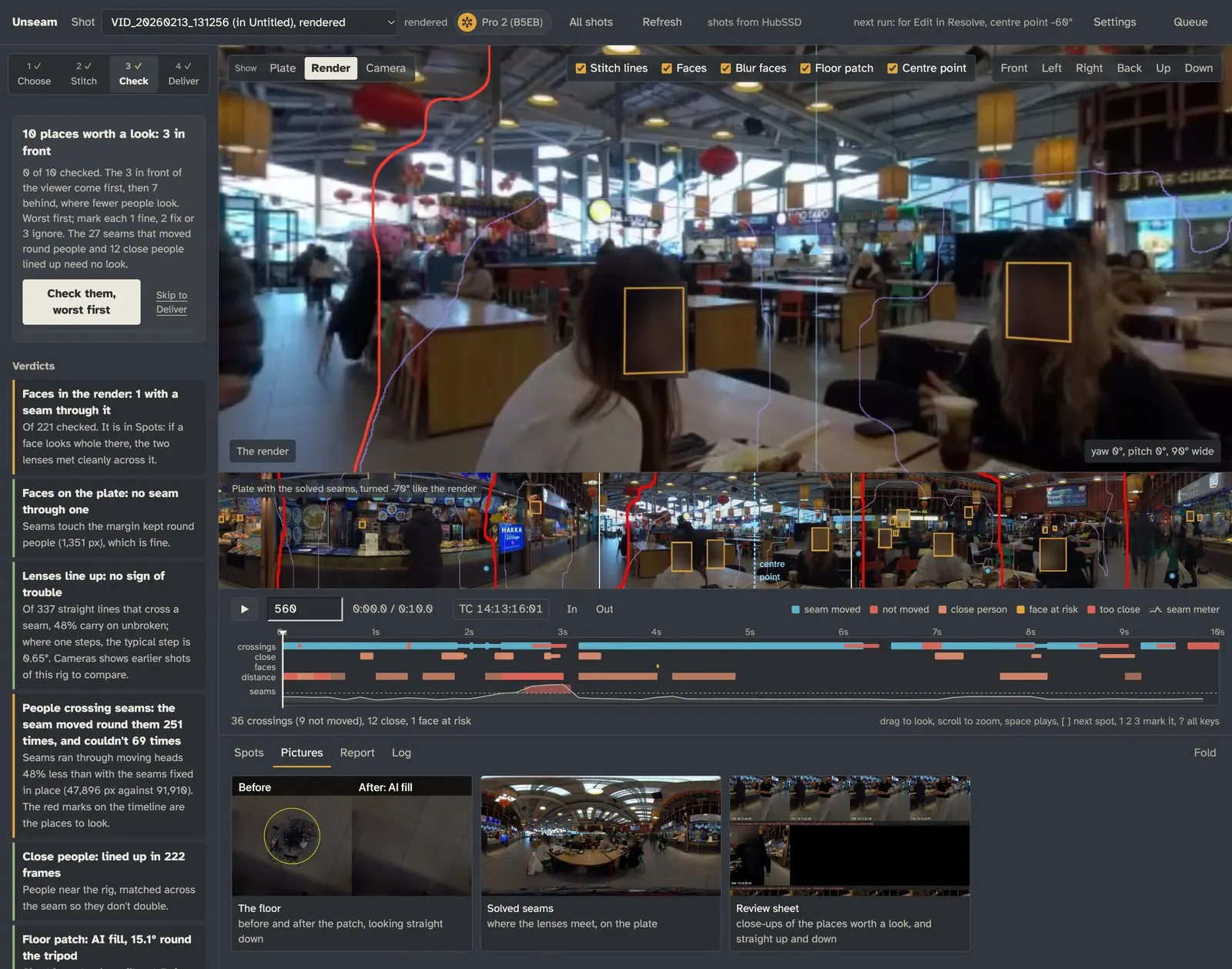
Unseam checking a 360 shot of a food hall: the places worth a look and the verdicts on the left, the picture with its seams and face boxes, a strip of the whole scene, and a timeline marking where people crossed seams, how close they came, and the seam meter. Faces are blurred.
Checking a food hall shot in Stitch. Faces blurred.
Insta360 Pro 2
Unseam’s timeline: lanes marking each place a seam moved round someone (blue), each crossing it couldn’t avoid (red), people near the camera lined up, a face at risk, and how close people came to the camera, and under them the seam meter, low and flat except for one red spike above its dashed line where the playhead stands
A scope for stitching: each place it moved a seam, or couldn’t, and the seam meter underneath. The spike is someone passing within a metre of the camera.

In Stitch · Ready

The tripod, gone by itself

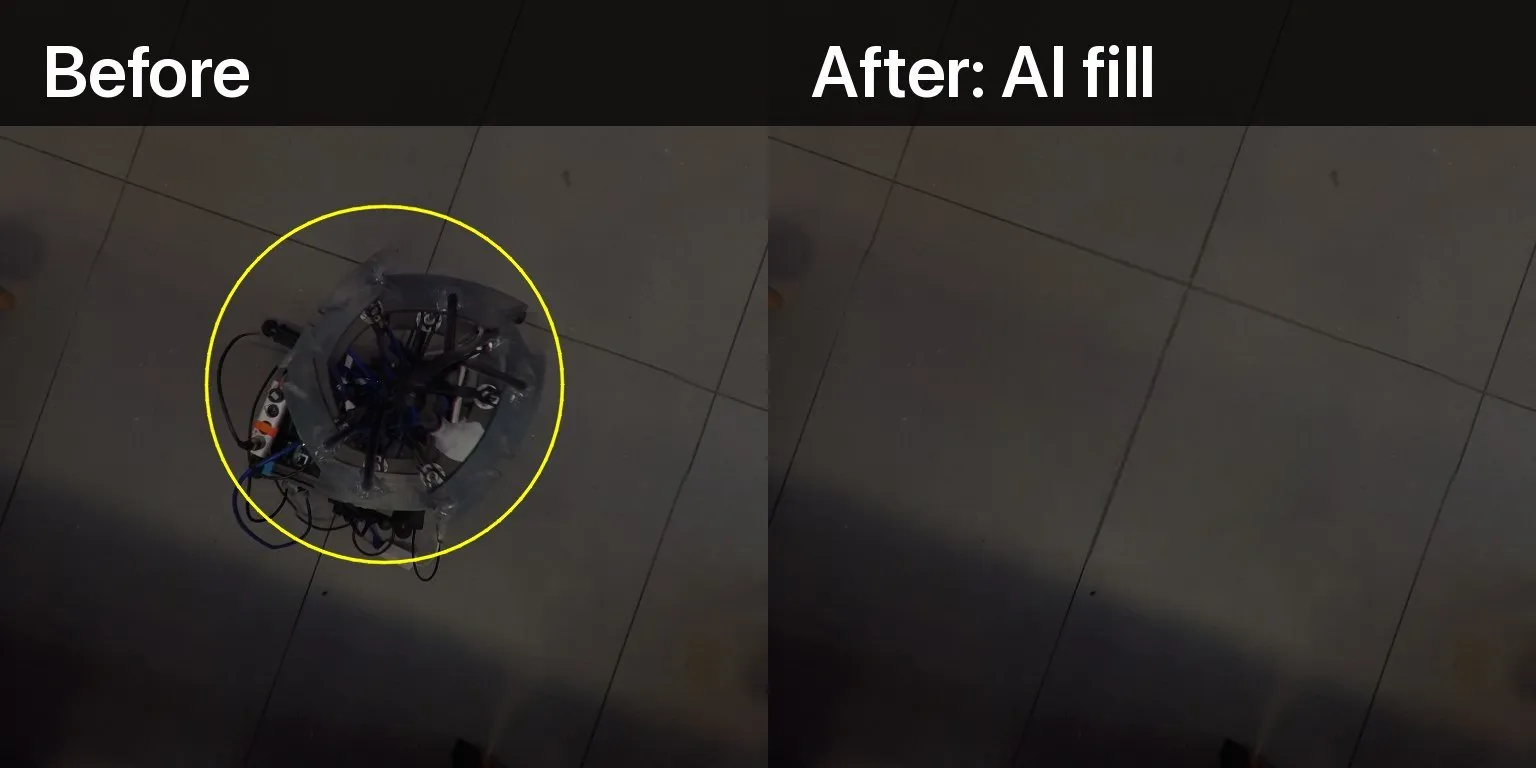
On a stitched shot, Unseam measures the rig’s footprint and paints the floor in with AI fill, on your Mac. Where matching floor is close by, it copies that instead, with the tile joints lined up. The patch follows the floor’s light through the shot, and gives way when someone’s foot steps over it.

No mask to draw, no logo to place, no clean plate to shoot.

Looking straight down from the camera: before, the tripod and its cables in the middle of a tiled floor; after, the floor painted in with no sign of the rig
Looking straight down: before, and after AI fill
Nadir

In Patch and Stitch

Ready for Resolve, Premiere Pro and headsets

ProRes for Resolve and Premiere Pro, plus files for Quest, Vision Pro and YouTube VR, 360-tagged, with the sound and timecode. Stitch reads timecode from the LTC on the camera’s audio and adds your spots and marks as timeline markers.

Private, and GDPR-ready

Patch and Stitch run on your Mac and need no account: your footage never leaves it, and nothing phones home. Faces and number plates are found and blurred through the shot in the delivered video, so public places can be filmed and shared.

Works with Claude, over MCP

Unseam has its own MCP server, so Claude, or any assistant that speaks MCP, can tell you what failed overnight, queue a shoot, or go through a shot’s spots with you. It only starts a run when you say yes, and only sees a shot’s pictures when you switch that on, never the footage.

Unseam Cloud · Coming later

Review links for clients

Not built yet. The idea: the client page and the video behind a link, so your client can look round, leave notes and sign off, and their notes come back into the shot in Unseam. No more big files to send, or feedback by email that says “about a minute in, on the left”. A subscription, on top of Patch or Stitch.

Until then, Patch and Stitch make the client page as a file you can send or put on any web host.

Join the preview

We’re looking for a small group of 360 shooters to try Unseam before it’s released, Patch first. Tell us which one you’re after and a little about how you work, and we’ll be in touch.

It runs on a Mac with Apple silicon. Patch takes a finished video from any camera; Stitch is for the Insta360 Pro 2 to start with. On Windows? Sign up anyway and tell us: it helps us decide what comes next.

Or email ben@immersi.co.uk

We only use your details to contact you about Unseam.